A reliable lead capture workflow records the source and consent, checks for duplicates and sends the lead to the right sales owner.
Lead capture automation collects enquiries from forms and ads, checks existing records and routes each valid contact into your CRM.
This guide covers validation, consent, deduplication and routing, then shows a real Facebook Lead Ads, Make.com and Pipedrive workflow.
What is lead capture?
Lead capture is the process of collecting contact details and consent from prospects who engage with your brand, then recording that data in your systems for follow up. Think form fills, chat handoffs, native lead forms on ad platforms, event scans, and trial signups, all flowing into your CRM or CDP with accurate attribution and permissions.
Lead capture vs lead generation
Leaders often use these interchangeably, but they are distinct motions. Use the right terms to fix the right problems.
| Aspect | Lead capture | Lead generation |
|---|---|---|
| Purpose | Records contact details and consent | Creates interest and demand |
| Typical work | Forms, validation, deduplication, CRM routing | Content, ads, events and referrals |
| Measure | Form completion, data quality, response time | Reach, engagement and cost per lead |
How does lead capture automation work?
Lead capture automation is the orchestration of tools and workflows that ingest prospect data from every channel, validate and enrich it, secure consent, deduplicate identities, score intent, and route to the right next step, all without manual effort.
How it works end to end:
- Ingest, pull leads from forms, chat, ad native lead forms, events, webinars, and trial signups through APIs and webhooks into your CRM or CDP.
- Validate, check email and phone formats, verify domains, and block obvious spam or test data.
- Consent and privacy, record consent basis, capture UTM and source, apply geo specific policies like GDPR and TCPA.
- Enrich and normalize, append firmographics and roles from providers such as Clearbit or ZoomInfo and standardize fields for segmentation.
- Identity resolution and dedupe, match to existing accounts and contacts. Merge duplicates and maintain golden records.
- Scoring and intent, apply rules or predictive scoring and add third party intent where available. Prioritize sales ready leads.
- Routing and activation, assign owners, trigger alerts in Slack or email, drop prospects into nurture sequences, or book meetings automatically.
Prompt follow-up matters. Harvard Business Review research found that many companies respond too slowly to online enquiries. Measure the time from form submission to first contact in your own workflow.
What does lead capture automation improve?
- Fewer missed enquiries. Routing and alerts show the sales team who owns each lead and when to respond. Track your own time to first contact in the CRM.
- Clearer campaign data. Consistent source and UTM fields reduce reconciliation work and help you assess each channel.
- Cleaner data, fewer manual corrections. Validation and deduplication before CRM routing reduce duplicate records and the work of fixing them.
- Compliance by design. Consent logging, preference management, and geographic rules reduce regulatory risk for GDPR, ePrivacy, and TCPA.
- A clearer sales handoff. The owner receives the contact, source and history in the CRM rather than searching across tools.
- Steady intake. The workflow can capture enquiries outside office hours, while the team follows up within the agreed response window.
- Reliable measurement. Source and campaign data captured consistently give you trustworthy funnel metrics and multi touch attribution.
How can you capture more qualified leads?
Ask only for details sales needs and test form completion. HubSpot form research shows that results vary by context; extra fields can add friction.
- Use conversational capture. Route website visitors to live chat or bots that qualify and book meetings. Speed and convenience win, especially on mobile.
- Offer value packed lead magnets. Templates, calculators, diagnostic audits, or interactive tools outperform generic ebooks because they solve a real job.
- Run native lead forms on ads. LinkedIn, Meta, and Google support instant forms that reduce clicks. Sync them directly to your CRM through APIs to keep speed to lead.
- Webinars and events with auto follow up. Gate registration, scan badges on site, and trigger post event sequences with slides, highlights, and a direct calendar link.
- Free trial or freemium signups. For product led motions, capture minimal friction signups and enrich behind the scenes so sales sees business context.
- Exit intent and retargeting. Use polite, value oriented offers when visitors intend to leave, then follow up with channel appropriate nurture.
- Partner and referral capture. Provide co branded landing pages and trackable links so partner sourced leads flow cleanly into your systems.
- Offline to online bridges. QR codes on collateral and booths that land on short forms tied to the specific campaign, with UTMs and consent baked in.
What should a lead capture workflow include?
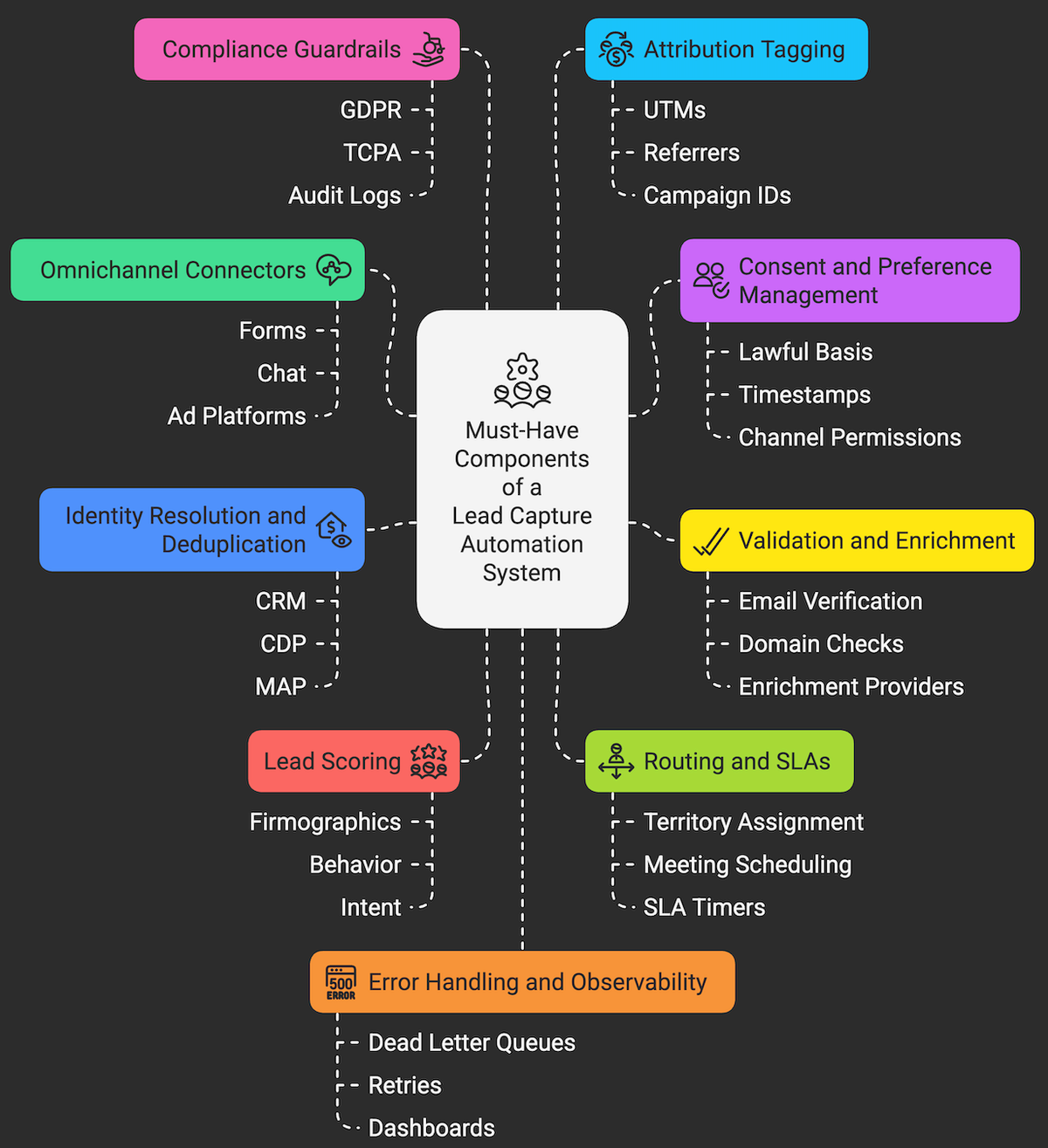
- Omnichannel connectors. APIs or native integrations for forms, chat, ad platforms, webinars, event scanners, and trial apps.
- Consent and preference management. Capture lawful basis, timestamps, language, and channel permissions. Respect and propagate preferences across tools.
- Validation and enrichment. Email and phone verification, domain checks, and enrichment from providers such as Clearbit, ZoomInfo, or Apollo.
- Identity resolution and deduplication. Matching logic across CRM, CDP, and MAP to maintain a single contact and account record.
- Lead scoring. Rules based and predictive scoring that combine firmographics, behavior, and intent to focus sales on high yield work.
- Routing and SLAs. Territory or round robin assignment, meeting scheduling links, and SLA timers with alerts in Slack or email.
- Compliance guardrails. Geo aware policies for GDPR and TCPA, suppression lists, and audit logs accessible to legal and security.
- Attribution tagging. Capture UTMs, referrers, campaign IDs, and creative to power channel level ROI analysis.
- Error handling and observability. Dead letter queues, retries, and dashboards so ops can see and fix issues fast.
- Data store and governance. Your CRM as a system for record, plus a CDP or warehouse for analytics, with clear field naming and ownership.
Real example: Facebook leads in Pipedrive
In a real-estate lead management project, Makeitfuture connected Facebook Lead Ads, Make.com and Pipedrive. The diagram shows how the contact is checked before creation or update.
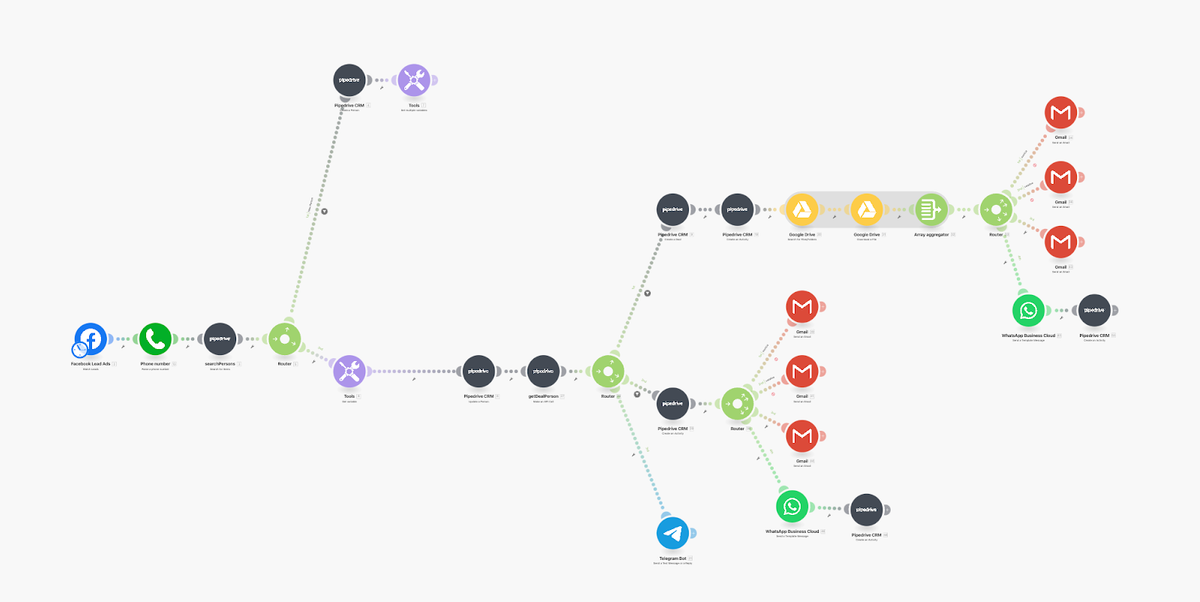
- When someone submits the Facebook form, Make.com searches Pipedrive and creates or updates the contact. The workflow also creates or updates the related deal.
- The automation retrieves the relevant presentation files from Google Drive and attaches them to a welcome email. It also sends a WhatsApp message.
- The sales team receives a Telegram alert with the lead details and source.
- The result is an updated Pipedrive record and a clearer handoff to sales. The published case study does not report conversion or time-saved figures.
How can Makeitfuture help with lead capture automation?
A useful lead capture workflow brings a contact into the CRM with its source, consent and next step clear. Start with one channel and check the data before expanding the automation.
Makeitfuture connects forms and campaigns to your CRM with validation, duplicate checks, routing and error alerts. We start with the workflow where enquiries are currently being lost.
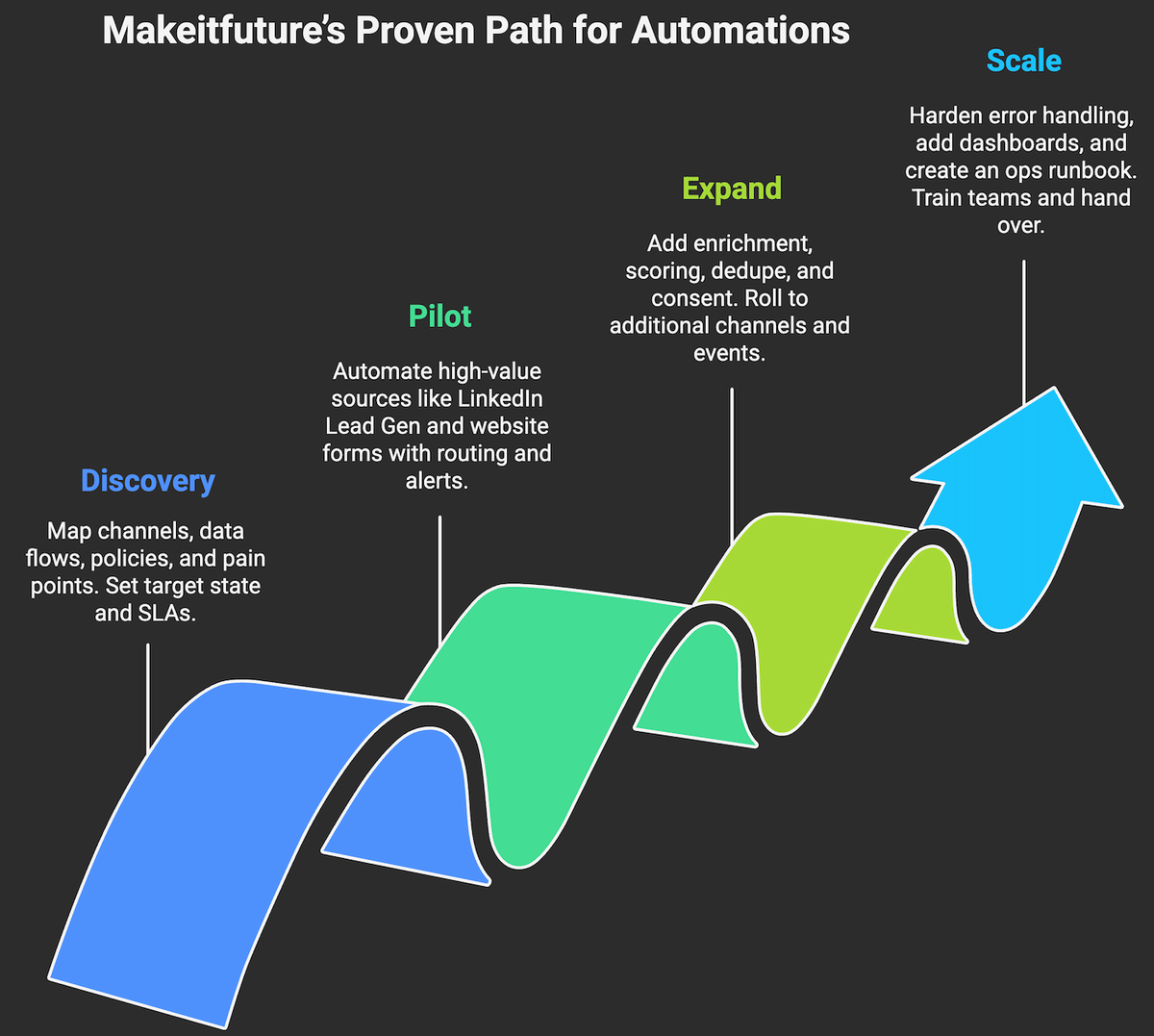
- Discovery, map channels, data flows, policies, and pain points. Set the target state and SLAs.
- Pilot, automate one or two high value sources first, such as LinkedIn Lead Gen and website forms, with full routing and alerts.
- Expand, add enrichment, scoring, dedupe, and consent. Roll to additional channels and events.
- Scale, harden error handling, add dashboards, and create an ops runbook. Train teams, then hand over.
See our AI marketing automation services for CRM-connected capture, qualification and follow-up workflows.