Exploring alternatives to Dell Boomi Informatica Workato is essential for businesses seeking advanced integration solutions.
If you are comparing Dell Boomi competitors for an integration platform as a service, this guide lays out seven strong alternatives with where they fit, core features, pros and cons, and current pricing approaches. You will see how each option supports API led connectivity, event driven flows, data integration, and automation at scale, so you can match the tool to the outcomes you need.
We also include a quick comparison table and a practical set of selection criteria to help you run a fast, defensible decision process.
WHY SEEK ALTERNATIVES TO DELL BOOMI?
Boomi is a capable enterprise iPaaS, but you may want an alternative to reduce total cost of ownership, accelerate citizen developer adoption, deepen API management, or optimize for SAP, NetSuite, or data engineering heavy scenarios.
Gartner defines iPaaS as a cloud service enabling development, execution, and governance of integration flows, and different vendors emphasize different strengths, which is why a fit for purpose choice matters.
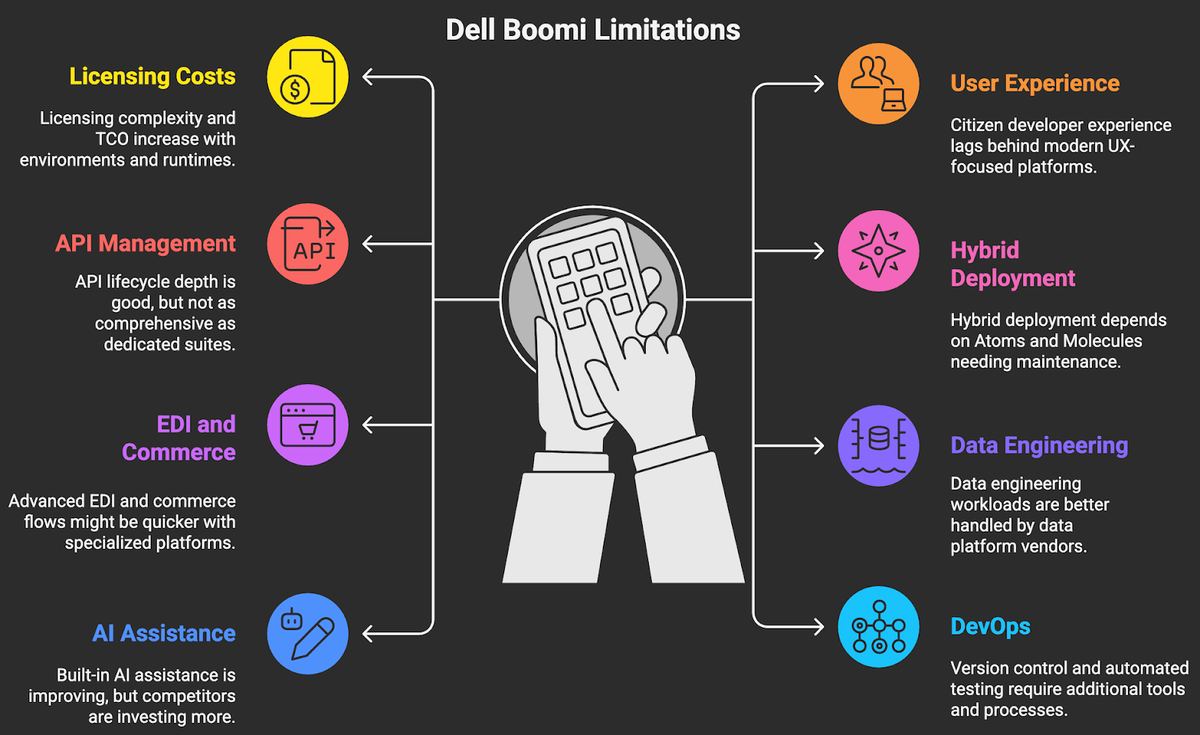
Here are some Dell Boomi limitations:
- Licensing complexity and TCO at scale, environments and runtimes add up.
- Citizen developer experience can trail more modern UX first platforms.
- API lifecycle depth is solid, though not as extensive as leading API management suites.
- Hybrid deployment relies on Atoms and Molecules that require care and patching.
- Advanced EDI and commerce flows may be faster to deliver with specialist platforms.
- Data engineering workloads, ELT and lineage are stronger in data platform vendors.
- Built in AI assistance and mapping recommendations are improving, but rivals now lean in here.
- Version control, automated testing, and GitOps patterns require extra tooling and process to be first class.
1. WORKATO
What it is and how it helps: Workato is an enterprise automation and iPaaS platform that lets IT and business teams build integrations and automations using low code “recipes,” with strong governance, API management, on premises connectivity, event streaming, and chat based experiences via Workbot for Slack and Microsoft Teams. It offers thousands of prebuilt connectors, SDK to build more, robust error handling, and lifecycle controls across dev, test, and prod.
Short history and what they are known for: Launched in the last decade, Workato popularized a recipe centric model that brought integration and automation closer to business teams while maintaining enterprise guardrails. Analysts have consistently recognized Workato for usability and time to value in the enterprise segment.
Why it is a Boomi alternative: You get faster delivery for departmental automation and chat centric workflows, strong governance, and broad SaaS connector coverage with a UX that empowers non developers without sacrificing control.
Best use case: Cross functional automations spanning GTM, finance, and support, with human in the loop experiences in Slack or Teams, plus API enablement for product integration teams.
Pros for using Workato
- High velocity, low code UX that still enforces enterprise governance.
- Workbot brings automations into Slack and Teams for real time operations.
- Broad connector library and SDK for custom connectors.
- Mature lifecycle, roles, and access controls for IT ownership.
- Good event handling and near real time orchestration.
Cons of Workato
- Pricing based on recipe capacity and packages can be complex to forecast at scale.
- Deep B2B EDI and managed file transfer are not the primary focus compared to specialists.
- Heavy duty data engineering or ELT pipelines are better suited to data platforms.
Available pricing options (2026):
- Business and Enterprise subscriptions are available through sales.
- Packaging typically includes workspace capacity, recipe packs, and connector access, with usage and environment add ons. Expect quote based pricing for most deployments.
2. MULESOFT ANYPOINT
What it is and how it helps: MuleSoft Anypoint Platform covers end to end API and integration lifecycle, including design, governance, runtime, observability, and marketplaces. It supports API led connectivity, microservices integration, eventing, and batch. CloudHub provides managed runtimes, and there are complementary products for citizen integrators and RPA.
Short history and what they are known for: MuleSoft built its reputation on API led connectivity and was acquired by Salesforce, which extended its reach into SaaS and automation. It is frequently cited by analysts for comprehensive API lifecycle and enterprise scale governance.
Why it is a Boomi alternative: If your priority is deep API lifecycle, multi cloud deployment options, and strict governance across complex domains, MuleSoft provides a broader API management surface area and runtime control.
Best use case: Enterprise wide API programs, regulated environments, and high throughput core systems integration, especially where Salesforce footprint is strategic.
Pros for using Mulesoft
- Full API lifecycle management with strong policy and governance controls.
- Robust runtimes for microservices and complex enterprise patterns.
- Large connector ecosystem and mature transformation language with DataWeave.
- Enterprise observability, SSO, and secrets management built in.
Cons of Mulesoft
- Licensing and sizing with vCores can be complex and premium priced.
- Steep learning curve for non developers, even with adjunct low code tools.
- Time to initial value can be longer for smaller teams or simple automations.
Available pricing options (2026):
- Subscription, typically sized by runtime capacity, environments, and capabilities, and sold through sales.
- Citizen integration and RPA modules have separate plans. Expect quote based pricing.
3. ZAPIER
What it is and how it helps: Zapier is a no code automation platform with over six thousand app connections for event triggered workflows, multi step logic, webhooks, and light transformations. It is known for speed to value, especially for SaaS to SaaS automation by business teams.
Short history and what they are known for: Zapier helped popularize no code automation for SMB and mid market teams. Its app directory continues to expand, which makes it a great fit for long tail SaaS connectivity.
Why it is a Boomi alternative: When you do not need enterprise scale governance or complex patterns, Zapier can deliver automations at a fraction of the cost and time.
Best use case: Departmental automations for marketing, sales, CS, and finance, plus quick prototypes that can later be promoted to enterprise iPaaS when they justify it.
Pros for using Zapier
- Very fast time to value and minimal learning curve.
- Large and fast growing catalog of app connectors.
- Good for experimentation and proof of concept automations.
- Affordable entry tiers for small teams.
Cons of Zapier
- Limited governance compared with enterprise iPaaS platforms.
- Task based limits and API rate limits can constrain heavy workloads.
- Complex branching logic and reusable components are more limited.
- Data residency and advanced security features are restricted to top tiers.
Available pricing options (2026):
- Free and tiered paid plans typically labeled Starter, Professional, Team, and Company, with features that scale by tasks per month, users, and security controls.
- Enterprise SSO and advanced governance require the Company plan.
4. CELIGO
What it is and how it helps: Celigo integrator.io is an iPaaS with strong prebuilt “Integration Apps,” especially for NetSuite centric processes like order to cash and ecommerce, plus a visual flow builder, error management, and a good library of connectors.
Short history and what they are known for: Celigo has long focused on operationalizing business processes around NetSuite, Shopify, Amazon, Salesforce, and 3PLs, reducing time to production with packaged integrations and mappings.
Why it is a Boomi alternative: If your core ERP is NetSuite or your commerce stack is standard, Celigo’s packaged content can shorten delivery timelines and lower implementation cost compared to more generalist iPaaS.
Best use case: Mid market companies with NetSuite as a system of record and ecommerce or marketplace integrations that follow common patterns.
Pros for using Celigo
- Deep NetSuite and commerce templates lower project risk.
- Balanced UX for IT led and business assisted delivery.
- Good error management, replay, and monitoring for operations teams.
Cons of Celigo
- Outside NetSuite centric scenarios, templates may be less extensive.
- API management depth and event streaming are not the main focus.
- Very complex custom patterns could be slower to model than in MuleSoft or Boomi.
Available pricing options (2026):
- Tiered subscriptions typically based on flows, connectors, and environments, with enterprise features available via higher tiers.
- Pricing is primarily quote based.
5. INFORMATICA
What it is and how it helps: Informatica’s Intelligent Data Management Cloud combines application integration and API management with market leading data integration, ELT, data quality, and governance. It is designed for a data intensive and regulated environment.
Short history and what they are known for: Informatica has been a fixture in enterprise data integration and metadata governance, with AI assisted capabilities under the CLAIRE umbrella across its cloud products.
Why it is a Boomi alternative: When your priority is robust data pipelines, governance, lineage, and MDM combined with app integration and APIs, Informatica offers a unified approach.
Best use case: Analytics modernization, data warehouse and lakehouse integration, and compliance heavy industries that need lineage and policy enforcement across data and app integration.
Pros for using Informatica
- Top tier data integration, quality, cataloging, and lineage.
- Strong hybrid support for on premises and multi cloud sources.
- AI assisted mapping and metadata discovery across large estates.
Cons of Informatica
- Portfolio breadth can increase complexity for smaller teams.
- Application integration UX is more technical than no code first tools.
- Consumption credit models require careful capacity planning.
Available pricing options (2026):
Consumption based credits and edition tiers across IDMC services, generally quote based for enterprise deployments. See the latest packaging and credit models.
6. SAP INTEGRATION SUITE
What it is and how it helps: SAP Integration Suite on SAP BTP brings Cloud Integration, API Management, Event Mesh, Open Connectors, and Integration Advisor for B2B mappings, with hundreds of prepackaged integration flows for SAP to SAP and SAP to third party scenarios.
Short history and what they are known for: Evolving from SAP PI and PO, the cloud suite is the strategic integration layer for S/4HANA transformations, tightly aligned to SAP reference processes and events.
Why it is a Boomi alternative: If SAP is your digital core, the suite offers first class connectivity, packaged content, and lifecycle alignment with SAP security and operations.
Best use case: SAP centric landscapes, S/4HANA migrations, and B2B processes that benefit from Integration Advisor’s semantic mappings.
Pros for using SAP INTEGRATION SUITE
- Deep SAP content and prebuilt packages cut delivery time for SAP processes.
- Integrated API management and eventing on SAP BTP.
- Integration Advisor accelerates B2B mapping and standards alignment.
Cons of SAP INTEGRATION SUITE
- Non SAP connector breadth and no code UX lag behind generalist iPaaS leaders.
- Requires SAP BTP familiarity for operations and security configuration.
- Pricing and entitlements can be complex for new SAP customers.
Available pricing options (2026):
- Available as subscription service plans or via BTP consumption with cloud credits.
- Pricing varies by capabilities and message capacity.
7. JITTERBIT
What it is and how it helps: Jitterbit Harmony is an iPaaS with visual design, prebuilt connectors, API management, and deployment across cloud and on premises agents. It focuses on fast delivery for common enterprise and mid market patterns.
Short history and what they are known for: A long time integration vendor with a reputation for approachable tooling and strong support, Jitterbit is often shortlisted for Salesforce, NetSuite, and Microsoft centric integrations.
Why it is a Boomi alternative: You get a simpler operational model and competitive pricing with enough depth for most mid market workloads.
Best use case: Rapid Salesforce to ERP synchronization, order to cash, and moderate volume B2B integrations that need quick time to value.
Pros for using Jitterbit
- Fast setup and straightforward UX for delivery teams.
- On premises agents and hybrid deployment support.
- Competitive total cost of ownership for mid market.
Cons of Jitterbit
- API lifecycle and governance depth may be lighter than MuleSoft.
- Smaller community and marketplace than the largest iPaaS vendors.
- Very high throughput or ultra low latency patterns may need tuning or another fit.
Available pricing options (2026):
- Packaged editions with capabilities and environment limits, primarily quote based.
- You can review current options on the vendor site.
QUICK COMPARISON OF DELL BOOMI COMPETITORS
Use this snapshot to align the platform to your dominant integration patterns, governance needs, and cost envelope. It is not exhaustive, but it helps narrow your shortlist fast.
Platform Best fit Standout strengths Where it is weaker Pricing approach Boomi General purpose enterprise iPaaS Broad connectors, hybrid with Atoms, solid API and B2B Citizen dev UX, cost at scale, GitOps test automation Subscription, quote based Workato Departmental and chat centric automation, API enablement Usability, Workbot, fast delivery, strong governance Deep EDI, heavy data engineering Subscription, package based, quote MuleSoft Anypoint Enterprise API program and complex microservices API lifecycle, governance, runtime flexibility Cost, learning curve for non devs Subscription by capacity, quote Zapier SMB and team automations, prototypes Speed, 6k+ apps, low entry cost Governance, throughput, advanced logic Public tiers plus enterprise Celigo NetSuite and commerce heavy mid market Packaged Integration Apps, faster go live General API management depth Tiered subscriptions, quote Informatica Data intensive and regulated organizations Data integration, quality, lineage, governance No code UX for app integration Consumption credits and tiers SAP Integration Suite SAP centric landscapes, S/4 transformations SAP content, Integration Advisor, BTP alignment Non SAP breadth, onboarding complexity BTP subscription or consumption Jitterbit Mid market, Salesforce and ERP integrations Approachable UX, quick wins, hybrid API governance depth at the very high end Packaged editions, quote
HOW TO CHOOSE THE RIGHT IPAAS?
Anchor your evaluation on measurable outcomes. Then map those to patterns, governance, and cost. The right iPaaS aligns to your integration mix, not the other way around.
- Integration patterns, API led, event streaming, batch ETL, B2B EDI, file based, and robotic tasks.
- Throughput and latency targets, including spikes, SLAs, and backpressure handling.
- Security and compliance, SSO, role based access, audit trails, secrets, data residency.
- Governance and lifecycle, environments, CI and CD, test automation, rollback, versioning.
- Citizen developer enablement, UX for non developers, and IT guardrails to prevent sprawl.
- Connector coverage and quality for your top 25 systems, including depth of objects and actions.
- Total cost of ownership, licenses, environments, connectors, infrastructure, and support effort.
- Architecture fit, SAP or NetSuite centric, microservices estate, data engineering needs.
- Observability, real time monitoring, alerting, distributed tracing, and MTTR benchmarks.
- AI assistance and productivity, mapping suggestions, natural language builders, and policy checks.
- Vendor ecosystem and talent availability, partner network, training, certifications.
- Exit strategy, portability of integrations, open standards, and vendor lock in risk.
For a structured selection, pick a three use case pilot, define clear success metrics like time to first integration, error rate under load, and hours to add a new endpoint, then run a 30 day bake off across your shortlist. If you want a checklist tailored to your environment, contact us.
If you want more integration strategy content, explore our selection of success stories and our blog.