The best Calendly alternative depends on the scheduling job: Cal.com gives product teams more control, Doodle handles group availability, SimplyBook.me and Acuity suit appointment businesses, and YouCanBookMe provides detailed booking messages.
We compared each platform by its scheduling model, team controls, integrations, deployment options and published pricing. Prices change, so verify the linked vendor page before buying.
Which Calendly alternative is best for your use case?
Calendly remains a strong choice for standard one-to-one and team scheduling. An alternative makes sense when you need self-hosting, group polls, appointment inventory, payments or deeper control over booking communications.
How did we evaluate these Calendly alternatives?
We reviewed the official product and pricing information for each platform, then compared the work each one is designed to handle. The assessment covers calendar support, routing, team scheduling, payments, API and webhook access, deployment control, security options and the pricing unit.
Cal.com's current pricing page lists a free individual plan and a Teams plan at $12 per user per month when billed yearly. It also documents routing forms, APIs, webhooks, role controls and EU hosting across relevant tiers. Those details make Cal.com a credible option for teams that need more technical control, but self-hosting also transfers maintenance and security work to your organisation.
For sales and recruiting teams, the scheduler is only one part of the process. The booking form should send qualification data into CRM, assign the correct owner and start follow-up work. Our sales automation service covers that full handoff, while recruitment automation applies the same principle to candidate screening and interviews.
You have a scheduling problem, not a calendar problem. The right tool should cut no shows, route meetings to the right person, and hand off clean data to your CRM or service system. This guide compares five strong Calendly alternatives, when to use each, and how to choose based on your workflow, compliance, and total cost of ownership.
Inside, you will find a quick comparison table, deep dives on Cal.com, Doodle, SimplyBook.me, Acuity Scheduling, and YouCanBook.me, plus practical selection criteria you can apply in an afternoon.
What are the common limitations of Calendly?
Calendly is a market leader and an excellent baseline for simple 1 to 1 and team scheduling. It integrates with Google and Microsoft calendars, supports round robin and collective scheduling, provides workflows and reminders, and connects with Zoom and many CRMs through native and marketplace integrations. For many teams, it just works out of the box and scales with SSO on enterprise plans.
Common reasons leaders still explore Calendly alternatives:
- Brand control and customization limits on lower tiers, for example custom domains and full white label, which can matter for customer experience and conversion.
- Advanced lead routing and conditional intake often require higher plans or third party automation. You may want built in routing forms or deeper API control.
- Seat based licensing can get expensive for large, occasional use teams. Alternatives with per calendar or per resource pricing can reduce TCO for specific patterns.
- No self hosting, which some regulated or security conscious organizations require for data residency or extended compliance controls. Consider open source options when this is non-negotiable.
- Appointment catalog and resource management for service businesses, classes, rooms, and equipment can be more robust in tools purpose built for services scheduling.
- Granular governance, role based permissions, and admin controls may be stronger in platforms that target larger operations or offer open source deployment and code level control.
How do the best Calendly alternatives compare?
Tool Best for Free plan Starting price Notable strengths Calendly General 1 to 1 and team scheduling at scale Yes From $10 per user per month Polished UX, strong integrations, mature team features. Cal.com Developers and teams needing open source, deep customization, or self hosting Yes From ~$12 per user per month Open source, self host option, powerful API and routing workflows. Doodle Coordinating large groups, scheduling across organizations via polls Limited From ~$6.95 per user per month Best in class group availability polls and one link participation. SimplyBook.me Service businesses that sell appointments, classes, or resources Yes From ~$9.90 per month Service catalog, payments, POS, memberships, multi location. Acuity Scheduling Solo to mid sized service providers wanting tight site embed and packages No From ~$16 per month Strong intake forms, packages, gift certificates, deep Squarespace embed. YouCanBook.me Google Calendar centric teams that need flexible templates and email logic No From ~$12 per calendar per month Highly customizable booking pages and notifications, per calendar pricing.
1. CAL
Cal.com is a modern scheduling platform built as open source infrastructure. It covers the familiar patterns, 1 to 1, round robin, and collective scheduling, and adds developer friendly building blocks for routing, workflows, and deep embedding in your product or website.
History and positioning.
Launched originally as Calendso, Cal.com grew rapidly in developer communities for its open source core and marketplace for apps and integrations. That foundation gives you unusual control over data, branding, and deployment model. Their GitHub presence signals an ecosystem for teams that want to extend scheduling rather than just configure it.
Why it is a Calendly alternative: If you need self hosting, custom domains, or want to embed scheduling deeply into your SaaS product, Cal.com is often the most flexible path. The open source option and strong API make it attractive where Calendly’s hosted model or customization limits are blockers.
Best use case: Product led growth teams embedding scheduling into onboarding; businesses with specific intake and routing logic; organizations requiring private cloud or on premises deployment for data governance.
Core features of Cal.com you will actually use:
- Open source core and optional self hosting for full data control, useful for strict compliance environments.
- Routing forms with conditional logic to qualify and route leads or clients before booking.
- Workflows for multi step reminders and post meeting actions via webhooks and apps.
- Multi person scheduling, round robin, and pooled availability for sales and support teams.
- Developer friendly API, embed options, and marketplace apps for video, payments, and CRMs.
Pros for using Cal.com
- Open source and self-hosting possibility reduce vendor lock-in and improve auditability.
- Highly customizable branding and custom domains for a seamless customer experience.
- Advanced routing and workflow automation built in, fewer external tools needed.
- Strong developer ergonomics, API first, and active ecosystem.
Cons of Cal.com
- More configuration overhead than plug and play tools if you do not need customization.
- Self hosting introduces infrastructure responsibility and security patching cadence.
- Feature depth can vary by community and paid tiers; validate critical enterprise controls like SSO and audit logs.
Pricing in 2026
Free community tier, Pro plans starting around $12 per user per month, team and enterprise tiers with SSO and advanced features, and a self hosted open source option.
2. DOODLE
Doodle focuses on solving the messy, cross organization group scheduling problem. It makes it trivial to propose times, poll large groups, and converge on a slot without accounts or back and forth. It also offers bookable pages for 1 to 1 meetings.
Founded in Switzerland, Doodle popularized the scheduling poll and remains synonymous with group availability coordination. The product has evolved to add one on one bookings and team features while keeping the minimalist poll flow that non technical participants adopt quickly.
Why it is a Calendly alternative: If your bottleneck is aligning many people across companies, especially when you cannot force logins, Doodle’s polling and confirmation flow beats standard booking links.
Best use case: Cross functional project reviews, customer advisory boards, hiring panels, and any recurring situation where large groups need to align quickly.
Core features of Doodle that matter:
- Group polls with timezone handling and no account requirement for invitees.
- 1 to 1 bookable pages for personal scheduling.
- Calendar sync with Google and Microsoft, plus video integrations.
- Automated reminders and follow ups after consensus is reached.
Pros for using Doodle
- Fastest path to consensus for large groups, minimal friction for guests.
- Strong adoption outside your org; no training required for invitees.
- Simple admin experience with templates for recurring poll formats.
Cons of Doodle
- Less control over complex intake and routing logic compared with developer first tools.
- Branding and white label options are more limited than open source or fully customizable platforms.
- Not ideal for service catalogs, classes, or resource management.
Pricing in 2026
Limited free polling, paid plans typically start around $6.95 per user per month with team and enterprise options. Verify the current tiers and regional taxes.
3. SIMPLYBOOK.ME
SimplyBook.me is a full service booking system built for businesses that sell appointments, classes, and services. Think appointment pages with service descriptions, staff selection, locations, resources, and payments, rather than a personal booking link.
Operating for over a decade, SimplyBook.me is known for service business workflows, from memberships and coupons to POS and multi location support. It provides a hosted booking site, widgets to embed on your domain, and extensive “plugins” you can turn on as needed.
Why it is a Calendly alternative: Calendly is excellent for meetings. SimplyBook.me is purpose built for services. If you need a catalog of bookable services, resource allocation, or checkout flows with taxes and tips, SimplyBook.me fits better.
Best use case: Salons, clinics, tutoring, coaching practices, and multi location teams that need to manage staff rosters, rooms, equipment, and accept payments.
Core features of Simplybook.me that matter:
- Service catalog with staff, duration, buffer times, and resource assignment.
- Hosted booking site and embeddable widgets for your website and socials.
- Payments, deposits, memberships, coupons, and POS support.
- Notifications via email and SMS, plus integrations and API.
Pros of using SimplyBook.me
- End to end service booking flows, from discovery to checkout.
- Multi location and resource management built in.
- Feature toggles via plugins so you only enable what you need.
Cons of SimplyBook.me
- More operational setup than meeting centric tools.
- Interface depth can feel complex if you only need simple links.
- Feature availability may depend on tier and plugin credits, watch your configuration costs.
Pricing in 2026
Free tier with limited bookings, paid plans commonly start around $9.90 per month and scale with bookings, features, and plugin credits.
4. ACUITY SCHEDULING
Acuity Scheduling, part of Squarespace, is a polished appointment platform for solo and multi person service businesses. It excels at intake forms, packages and subscriptions, and tight website embedding, especially if you already use Squarespace.
Acquired by Squarespace, Acuity has long been a favorite of independent service providers and studios that want a professional, brand aligned booking experience that connects payments and customer communications.
Why it is a Calendly alternative: If your primary need is customers booking services rather than internal meetings, and you want packages, gift certificates, and robust forms, Acuity usually feels tailored to the job.
Best use case: Health and wellness, coaching, education, and studios that sell single sessions, packages, and classes, and want a smooth embedded booking flow on a marketing site.
Core features of Acuity Scheduling that matter:
- Intake forms per appointment type, with conditional fields.
- Packages, subscriptions, and gift certificates with Stripe, Square, or PayPal.
- Group classes, multi staff, and multi location scheduling.
- Email and SMS reminders and follow ups, plus cancellation and reschedule flows.
Pros for using Acuity Scheduling
- Smooth, brandable booking experience, especially on Squarespace websites.
- Rich commerce features for services, not just meetings.
- Reliable calendar sync and time zone handling.
Cons of Acuity Scheduling
- No free plan, so testing moves to trial quickly.
- Less extensible at the API level compared to developer first platforms.
- If you need self hosting or open source, this is not the fit.
Pricing in 2026
Plans typically start around $16 per month, with higher tiers for advanced features and teams.
5. YOUCANBOOKME
YouCanBook.me focuses on simple, reliable scheduling for Google Calendar users and teams, with uncommon depth in email template customization and booking page control. It is popular for external scheduling where tone and messaging matter.
An independent, long standing product, YouCanBook.me built a reputation for flexible templates, merge fields, and conditional messaging. Many teams use it to create multiple branded booking pages tied to different campaigns or regions.
Why it is a Calendly alternative: If you want more control over the content and logic in confirmations, reminders, and booking pages, or prefer per calendar pricing, YouCanBook.me is a strong fit.
Best use case: Customer success, education, and recruiting teams running multiple booking pages with distinct messaging, often mapped to different calendars or teams.
Core features of YouCanBook.me that matter:
- Per calendar pricing with unlimited booking pages reduces costs in certain setups.
- Highly customizable email and SMS templates with variables and conditional logic.
- Round robin and team distribution, buffers, and availability controls.
- Zoom and Google Meet integrations, webhooks, and Zapier for downstream automation.
Pros for using YouCanBook.me
- Best in class customization of notifications and booking page content.
- Straightforward admin and transparent billing tied to calendar connections.
- Strong fit for Google Workspace centric teams.
Cons of YouCanBook.me
- Fewer native enterprise governance controls compared with heavy duty platforms.
- Microsoft 365 centric environments should validate parity for calendar and SSO.
- Not designed for service catalogs or advanced payments.
Pricing in 2026
Typically from around $12 per calendar per month with a free trial, then discounts for annual billing. Verify latest plans and inclusions.
How should you choose a Calendly alternative?
The right choice depends on your dominant scheduling pattern, data requirements, and the unit economics of your licensing model. Map the work first, then the tool.
- Scheduling pattern. 1 to 1 and team routing, group coordination, or service catalog with payments. Choose a platform optimized for your most common flow.
- Licensing economics. Per user, per calendar, or per location. Model cost against actual adoption and meeting volume.
- Brand and UX control. Custom domain, CSS, email templates, and white label. A branded experience often lifts conversion from page view to booked meeting.
- Routing and intake. Native conditional forms, qualification, and distribution logic reduce ops time and improve lead handling quality.
- Integration depth. Native CRM integrations, webhooks, and API. Confirm support for Salesforce, HubSpot, Microsoft Dynamics, and your marketing attribution tags.
- Security and compliance. SSO, audit logs, data processing agreements, and data residency. Align with your privacy model and regulatory obligations.
- Global readiness. Time zones, language localization, SMS coverage, and accessibility standards.
- Operations and governance. Role based access, admin console, approval flows, and reporting that supports forecasting and QA.
- Change management. Training, content templates, and success resources. The best tool fails without adoption.
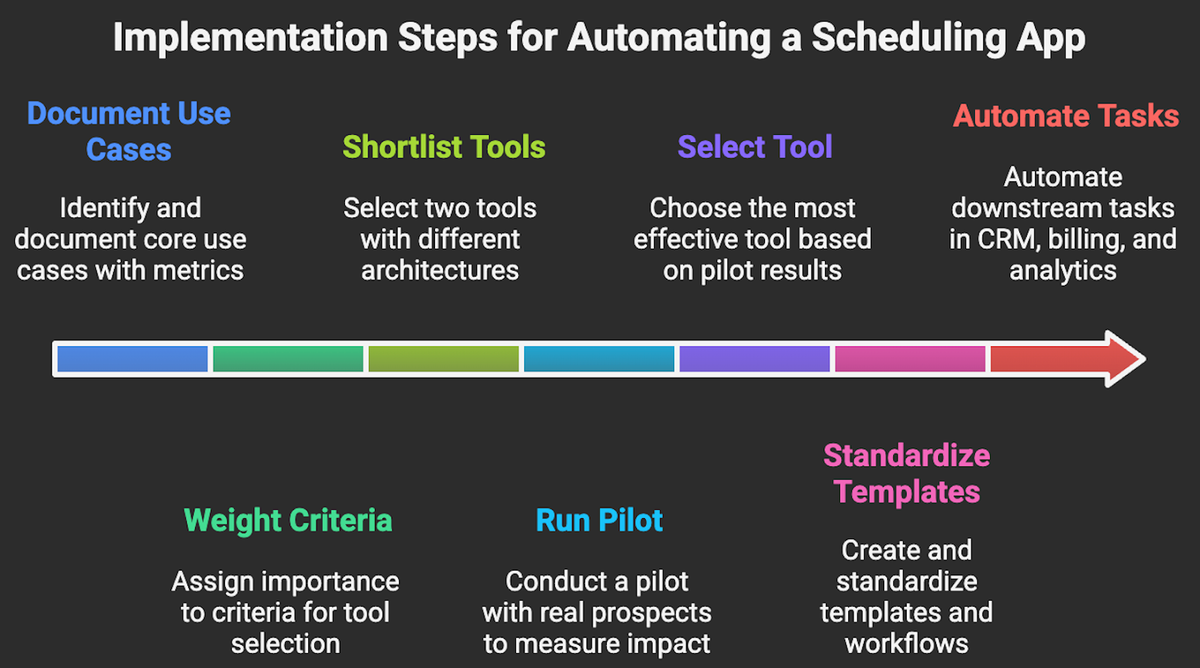
Follow these easy steps to get started with a scheduling automation:
- Document 3 to 5 core use cases with current metrics, for example time to first meeting, no show rate, and conversion from page view to booking.
- Weight the criteria above and shortlist two tools that differ meaningfully in architecture, for example open source versus hosted.
- Run a two week pilot with real prospects or clients, instrumenting UTMs and CRM fields to measure impact.
- Select, then standardize templates and workflows, and automate downstream tasks in CRM, billing, and analytics.
How can Makeitfuture automate scheduling workflows?
If you need open source and deep customization, Cal.com is the standout. If you need effortless group scheduling, choose Doodle. For service businesses, SimplyBook.me or Acuity will fit better than general meeting tools. If you value messaging control and per calendar pricing, YouCanBook.me is a smart pick. Match the tool to your scheduling pattern, then wire it into your CRM and analytics to prove ROI.
Makeitfuture helps you turn scheduling into a measurable growth and efficiency lever. We architect routing logic, integrate with Salesforce or HubSpot, automate post booking workflows, and surface performance dashboards so you can track cycle time, show rates, and revenue attribution.
If you want to see what this looks like in the real world, review our case studies to learn how we design, pilot, and scale automation that drives measurable outcomes. Need a personal assessment? Don’t hesitate to contact us here. We’ll make it work!
When should you stay with Calendly?
Stay with Calendly when your current booking flows work, adoption is high and the integrations cover your CRM and calendar stack. Migration has a cost: links must change, routing needs retesting and historical reporting may remain in the old platform.
Switch when a documented requirement is blocked, such as self-hosting, service inventory, group polling or a pricing model that fits occasional users better. Run a pilot with real meetings, measure booking completion and no-show rates, then test CRM attribution before replacing every link.
Frequently asked questions
What is the best free Calendly alternative?
Cal.com is a strong starting point for an individual who wants unlimited event types and calendars on a free plan. Teams should compare the paid controls they need, because routing, shared availability and administration differ by tier.
Is there a self-hosted Calendly alternative?
Yes. Cal.com publishes its source code and provides a self-hosted route. Your team becomes responsible for deployment, updates, monitoring, backups and security, so self-hosting is a governance decision rather than a free shortcut.
Which alternative is best for service businesses?
SimplyBook.me and Acuity Scheduling fit service bookings better than meeting-link tools. Compare appointment types, staff and resource allocation, payments, packages and reminder costs against your operating model.
Which Calendly alternative is best for group scheduling?
Doodle is designed around availability polls for people across different organisations. Collective and round-robin meetings are a different need, so assess those against Cal.com, Calendly and YouCanBookMe.
How should a company migrate away from Calendly?
Inventory active event types, booking links, routing rules, calendar connections, CRM fields and reminder messages. Rebuild and test them in parallel, update high-traffic links first and keep the old account available until upcoming meetings and reporting have been reconciled.