Automated accounting uses software, rules and AI to capture, classify, match, post and report financial transactions with little manual work, while people keep control of approvals and exceptions.
This guide explains how it works under the hood, what it saves, where it goes wrong, which processes and tools to start with, and how to roll it out without losing control of your books.
What is automated accounting?
Automated accounting is the practice of letting software do the repetitive parts of finance work: reading invoices and receipts, coding them to the right accounts, matching them to purchase orders and bank lines, posting entries to the ledger and producing reports. People still own the judgement calls, such as approving unusual spend, investigating exceptions and signing off the close, but they stop retyping numbers that already exist somewhere else.
It helps to separate three things that often get lumped together:
- Accounting software (Xero, QuickBooks, Sage, NetSuite) is where your ledger lives. On its own it records what you put into it.
- Bookkeeping automation is the set of rules inside that software, such as bank rules, recurring invoices and receipt capture, that cut down data entry for a single system.
- Accounting automation connects the whole finance process across systems. An invoice arrives by email, its data is extracted, the right person approves it in Slack or Teams, the bill is posted to the ledger, payment runs and the bank line reconciles itself, without anyone copying data between tools.
Most businesses already have the first, use some of the second and have barely started on the third. That third layer is where the larger savings sit, because it removes the handoffs between systems that cause most delays and errors.
How does automated accounting work?
Under the hood, almost every automated finance workflow follows the same five steps, whatever the tools involved.
1. Capture
Data enters the process from emails, supplier portals, bank feeds, your CRM, your ecommerce platform or a payment provider such as Stripe. Instead of someone downloading a PDF, a workflow picks it up the moment it lands.
2. Extract and classify
OCR and AI models read the document and pull out supplier, date, amounts, VAT and line items. This is the job of intelligent document processing, and it now copes with messy, multi-page invoices that older template-based OCR used to reject. Each field gets a confidence score, so low-confidence reads go to a person rather than straight into the books.
3. Validate and approve
Rules check the data against what you already know: does the supplier exist, does the invoice match the purchase order and goods receipt (two-way or three-way matching), is the amount within budget? Clean invoices pass through. Anything outside tolerance is routed to the right approver with the context they need.
4. Post and pay
Once approved, the entry is posted to your accounting system through its API, and payments are scheduled in batches. On the sales side, invoices are raised from CRM or order data and sent automatically, and reminders follow on a schedule.
5. Reconcile and report
Bank transactions are matched to open invoices and bills by rules that learn from past matches. Reports and dashboards refresh from the ledger on a schedule, so management sees cash and margin weekly rather than three weeks after month end.
The glue between these steps is an integration layer. That can be the native connectors inside your accounting software, an automation platform such as Make or n8n, or custom code where volumes or controls demand it.
What are the benefits of automated accounting?
The case for automation is mostly about cost per transaction, speed and control. Here is what the data shows.
- Lower cost per invoice. APQC benchmarking of 1,485 organisations found that the best-performing quarter process an accounts payable invoice for $2.07 or less, while the bottom quarter spend $10 or more. The gap is almost entirely manual handling: keying, chasing approvals and fixing mismatches.
- Faster close. When bank reconciliation and accruals run daily instead of in a month-end scramble, the close becomes a review rather than a rebuild, and month end takes days instead of a week of chasing.
- Fewer errors. Data that is never retyped cannot be mistyped. Validation rules catch duplicate invoices and wrong VAT codes before they reach the ledger, rather than at audit.
- Better cash visibility. Daily posting and reconciliation mean your cash position is accurate today, which makes payment runs and collections decisions easier.
- Stronger fraud controls. Organisations lose an estimated 5% of revenue to fraud each year, according to the ACFE's 2026 Report to the Nations. Enforced approval limits, supplier bank detail checks and a full audit trail make the common schemes much harder to run.
- Growth without extra headcount. Transaction volumes can double while the finance team stays the same size, because the extra work lands on the workflow, not on people.
Finance teams are moving quickly on this. A Gartner survey found that 58% of finance functions were using AI in 2024, up from 37% a year earlier, with intelligent process automation the most common use at 44%.
What are the risks and limitations of automated accounting?
Automation amplifies whatever process you give it. A good process gets faster; a broken one produces errors faster. These are the limitations worth planning for.
- Bad master data breaks everything. Duplicate suppliers, outdated VAT codes or an untidy chart of accounts cause exceptions and mispostings. Cleaning master data is unglamorous, and it is the first job.
- Over-automation removes useful friction. Posting every journal without review raises risk. Set value thresholds and keep human approval for unusual or high-value entries.
- AI extraction is not perfect. Document AI models make mistakes, especially on new supplier formats. Keep a person in the loop for low-confidence reads and log every decision for audit.
- Segregation of duties can slip. A new workflow can quietly let one person create, approve and pay an invoice. Map roles before you build, and review access regularly.
- Integrations need maintenance. APIs change and connectors fail. Every workflow needs error alerts, retries and an owner who notices when something stops.
- Costs can creep. Software licences, premium connectors and per-operation pricing add up. Track what each workflow costs against the hours it saves, and switch off the ones that do not pay back.
- Regulation keeps moving. In the UK, all VAT-registered businesses now keep digital records and file through compatible software under Making Tax Digital, and the government has confirmed mandatory e-invoicing for all VAT invoices from 2029. Workflows built today should be ready for structured e-invoices.
None of these is a reason to avoid automation. They are reasons to design it with controls from the start.
Which accounting processes should you automate first?
Start where volume, manual touches and errors meet. For most businesses, that order looks like this.
- Accounts payable. Invoice capture, coding, matching and approvals are high volume and rule-based, so they pay back first.
- Expenses and company cards. Receipt capture, automatic coding and policy checks remove a monthly chase that everyone dislikes.
- Accounts receivable. Invoices raised from CRM or order data, automatic reminders and cash matching from bank feeds shorten the time to get paid.
- Bank reconciliation. Daily rules-based matching leaves only genuine exceptions for a person to review.
- Month-end close. Recurring journals, accruals and checklist tasks run on a schedule, with sign-off tracked.
- Reporting. Management packs and dashboards refresh from the ledger instead of being rebuilt in spreadsheets.
A useful rule: automate the data capture and decision points first, then money movement, and finish with reconciliation and reporting. Each stage relies on clean data from the one before.
Which automated accounting tools should you consider?
Tool choice depends on your size, your number of entities and how much of the process has to cross system boundaries. Most stacks combine an accounting platform, a capture or payables tool and an integration layer.
| Tool | Type | Best for | Automation strengths |
|---|---|---|---|
| Xero | Accounting platform | Small and mid-sized businesses, multi-currency trading | Bank rules, repeating invoices, open API and a large app marketplace |
| QuickBooks Online | Accounting platform | Small businesses with simple inventory or projects | Bank rules, receipt capture, recurring transactions, workflows in the Advanced tier |
| Sage | Accounting platform | UK businesses that want a local vendor and accountant network | Making Tax Digital filing, bank feeds, integrations through Sage's marketplace |
| NetSuite | ERP | Mid-market and multi-entity groups | Approval workflows, consolidation, deep reporting and scripting |
| Dext | Capture tool | Firms and finance teams processing many receipts and bills | OCR extraction, supplier rules, publishing to Xero, QuickBooks and Sage |
| Make, n8n or Zapier | Integration layer | Connecting finance to CRM, ecommerce, banking and messaging | End-to-end workflows across systems, AI steps, approvals in Slack or Teams |
The accounting platform rarely limits what you can automate; the gaps between systems do. That is why the integration layer matters. Make is quick to build on and suits most finance workflows, n8n suits teams that want self-hosting and more control over data, and Zapier works well for simple, low-volume triggers. If you are still choosing a ledger and currently use Lexoffice, our comparison of Lexoffice alternatives covers Xero, QuickBooks Online and FreshBooks.
How do you implement accounting automation?
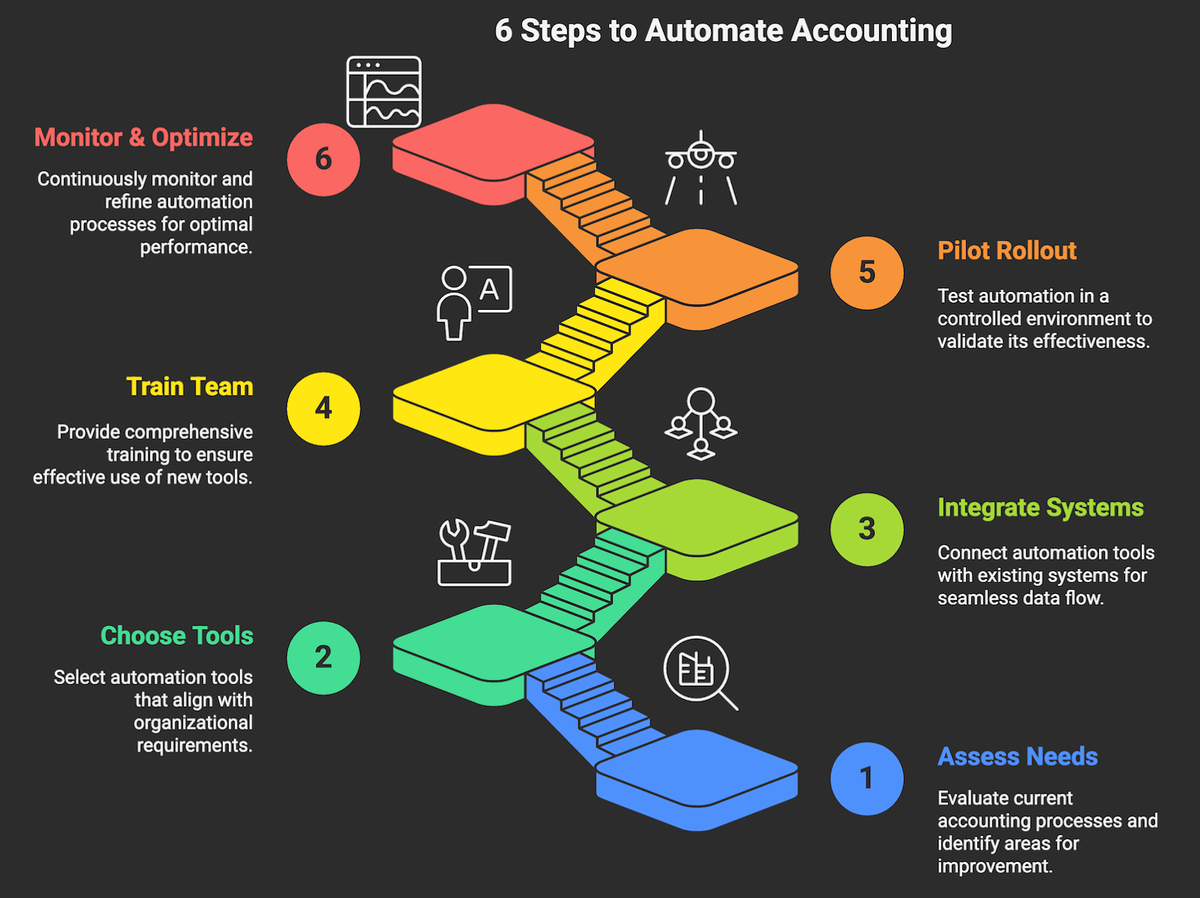
A phased rollout keeps risk low and proves value early. These six steps work for a growing company and for a larger finance team.
Step 1: Map the process and set a baseline
Document how work flows today, end to end, with volumes, systems touched, cycle times and where errors occur. Record baseline numbers such as cost per invoice, days to close and days sales outstanding, so you can prove the result later.
Step 2: Choose the tools for the job
Check that each tool supports your entities, currencies and volumes, has proper roles, approvals and audit logs, and exposes an API you can automate against. Count the full cost: licences, implementation, connectors and admin time.
Step 3: Clean data and connect systems
Fix supplier, customer and chart-of-accounts data before you automate on top of it. Connect the accounting system, bank, CRM and payroll through APIs rather than file exports, and document where each piece of data lives.
Step 4: Pilot one high-volume process
Start with one process in one entity, usually accounts payable. Prove the data flow, the controls and the exception handling with real transactions before you scale.
Step 5: Train the team and assign owners
Decide who owns exceptions, who maintains rules and who looks after supplier data. Train people on real transactions, and explain that the goal is more time for analysis, not fewer people.
Step 6: Measure, then expand
Track the KPIs from step 1 and compare them with the baseline. Review exceptions weekly and tune the rules, then roll out to the next process or entity once the pilot is stable.
Is automated accounting right for your business?
It is worth pursuing when at least a few of these are true: you process more than a few hundred invoices a month, the close takes more than a week, the finance team spends evenings on reconciliation, or you are adding entities, currencies or sales channels faster than you can hire.
It is probably premature if you have a handful of transactions a month and one system. In that case, the built-in rules in Xero or QuickBooks will cover most of what you need.
The middle ground is where most companies sit: a decent accounting platform, several systems around it and a lot of copying between them. This is where accounting automation services earn their keep, because the work is mostly about connecting systems and designing controls rather than buying another tool. Our own projects show the pattern. For ViennaHouse, automating long-stay guest billing in n8n reduced a workload of more than 100 staff hours a month across 40 hotels by 90%. For a European engineering group, fuel invoices are now matched to each vehicle and posted to Navision automatically. And a Belgian hotel chain moved its monthly payment reporting from Apaleo into Exact Online and AFAS without the Excel step.
Conclusion
Automated accounting replaces the copying, matching and chasing that fill a finance team's week with workflows that run every day and flag only what needs a person. The savings come from removing handoffs between systems, and the risks come from automating on top of poor data or weak controls. Start with accounts payable, keep people in charge of exceptions and measure against a baseline, and you will know within a quarter whether it is paying back.
Frequently asked questions
Will AI replace accountants?
No. AI and automation take over data entry, matching and routine postings, which frees accountants for review, analysis and advice. The judgement work, such as handling exceptions, interpreting tax rules and explaining the numbers to the board, still needs people, and those skills become more valuable as the routine work disappears.
What is an example of an automated accounting system?
A common example is accounts payable. Supplier invoices arrive in a shared inbox, AI extracts the data, the invoice is matched to its purchase order, the budget holder approves it in Slack, and the bill is posted to Xero and paid in the next payment run. The bank line then reconciles itself when payment clears.
Is automated accounting the same as accounting software?
Not quite. Accounting software is the ledger where transactions are recorded, and it includes some automation such as bank rules. Automated accounting covers the whole process around it, connecting the ledger to your inbox, CRM, bank, ecommerce and approval tools so data flows between them without manual copying.
How long does it take to automate accounting processes?
A first workflow scoped to one process, such as accounts payable, is usually live in weeks rather than quarters, including mapping, build and testing with real transactions. The timeline depends mostly on how clean your source data is, how many systems are involved and how many approvers sit in the process.
Is automated accounting compliant with Making Tax Digital?
It can be, and it often makes compliance easier. Making Tax Digital for VAT requires digital records and compatible filing software, and automated workflows keep a digital link from source document to VAT return. Check that your accounting platform is HMRC-recognised and that every automated step keeps an audit trail.