Exploring diverse automation examples can revolutionize the way SMEs and digital service providers operate.
Looking for practical workflow automation examples you can deploy without a year of change management? This guide walks you through eight high impact automations across CRM, marketing, social, finance, inventory, projects, support, and content operations. For each, you’ll see concrete use cases, tooling options, and the measurable outcomes you can expect.
You’ll also get a simple way to evaluate where to start, how to pilot, and how to scale with confidence. The goal is straightforward, unlock time, reduce errors, speed up cash flow, and create a repeatable operating system for growth.
BENEFITS OF WORKFLOW AUTOMATION FOR SMALL AND MEDIUM SIZED BUSINESSES
Automation is the fastest path to bankable efficiency. It standardizes repeatable work, stitches systems together, and removes handoffs that slow your teams down.
- Lower operating costs, fewer manual touches, less rework, and shorter cycle times across sales, service, and finance. Research consistently ties automation to productivity gains and quality improvements in core processes (McKinsey Global Institute).
- Higher revenue velocity, faster lead response, automated nurture, and accelerated quote to cash.
- Fewer errors and stronger compliance, standardized approvals, audit trails, and data validation at every step.
- Better data, better decisions, automated enrichment, consistent taxonomy, and reliable dashboards.
- Happier teams, removal of tedious swivel chair work so people focus on customers and outcomes.
- Built in scalability, processes that handle double the demand without doubling headcount.
1. CUSTOMER RELATIONSHIP MANAGEMENT (CRM) AUTOMATION
CRM automation streamlines the full revenue workflow, from lead capture to renewal. It orchestrates data, tasks, and communications across marketing, sales, and success, so nothing falls through the cracks. For SMEs, the upside is clear, faster response, consistent follow up, cleaner pipelines, and accurate forecasting.
Why it matters: Automated handoffs can lift conversion rates and response speed, both proven drivers of win rates for growth teams.
- Lead routing and SLA timers, new inbound leads auto assigned by territory or segment with alerts if first touch exceeds 5 minutes. Tools: Salesforce Flow, HubSpot Workflows, Zoho Assignment Rules.
- Automatic data enrichment, append industry, employee count, and tech stack using Clearbit or ZoomInfo when a lead is created, then score and segment accordingly.
- Pipeline hygiene automations, auto close stale opportunities after 30 days of inactivity, notify owners, and create a re engagement task.
- Renewal and expansion playbooks, 120, 60, 30 day renewal sequences, usage checks, and QBR scheduling triggered by contract end dates. Tools: Gainsight, HubSpot, Pipedrive.
- Deal desk approvals, discount thresholds or non standard terms trigger legal and finance approvals with timestamps and audit logs.
2. EMAIL MARKETING AUTOMATION
Email marketing automation delivers targeted, behavior driven messages at scale, not one size fits all blasts. It turns signups, visits, and purchases into timely, personalized emails that nurture and convert without adding headcount.
Why it matters: Email remains a top performing channel, with research indicating strong ROI when programs are automated and segmented.
- Welcome and onboarding sequences, personalized multi touch flows for new leads or customers based on their actions inside your app or site. Tools: HubSpot, Customer.io, Mailchimp, Klaviyo.
- Behavior triggered messages, cart abandonment, browse abandonment, pricing page revisit, or feature activation prompts connected to product analytics like Segment or GA4.
- Lifecycle and re engagement campaigns, automatic win back series when engagement drops below a threshold, dynamic content per segment.
- Lead scoring and MQL handoff, email engagement feeds the score, when the threshold is met, create a CRM task and enroll in a sales cadence.
- Send time optimization and A/B testing, machine learning features pick the best send time and subject line variant for each segment.
3. SOCIAL MEDIA AUTOMATION
Social automation schedules posting, coordinates cross channel publishing, and flags engagement that needs a human response. It keeps your brand present without wasting hours on manual posting.
Why it matters: Consistency across channels beats sporadic bursts. Automation supports cadence, governance, and rapid response to signals.
- Scheduled multi channel publishing, build weekly calendars, auto apply UTM tags, and tailor copy per platform. Tools: Buffer, Hootsuite, Sprout Social, Later.
- Social listening alerts, high intent keywords or competitor mentions trigger alerts and route to sales or PR based on rules.
- Auto moderation, filter and hide spam, profanity, or phishing links, escalate genuine complaints to support with context.
- Content recycling, evergreen posts auto rotate quarterly with fresh creative to fill gaps in the calendar.
- Analytics and reporting, weekly performance snapshots pushed to Slack or email for the marketing and leadership team.
4. ACCOUNTING AUTOMATION
Accounting automation reduces manual data entry, speeds up invoicing and payables, and strengthens controls. For SMEs, that means fewer errors, faster month end close, and healthier cash flow.
Why it matters: Modern finance teams use automation for invoice capture, approvals, and reconciliations to cut cycle time and improve accuracy.
- Bank feeds and auto categorization, rules in QuickBooks Online or Xero categorize transactions and flag anomalies for review.
- OCR based AP processing, capture invoices from email, extract fields, route for approval, then sync to the ledger. Tools: Bill, Tipalti, Airbase, Ramp.
- Automated invoicing and reminders, generate invoices on subscription renewal or project milestones, send reminders at 7, 14, and 30 days.
- Expense management, mobile receipt capture, automatic matching, and policy enforcement. Tools: Expensify, Divvy, Spendesk.
- Revenue recognition checks, apply rules for deferred revenue and schedule journal entries with approvals for exceptions.
5. INVENTORY MANAGEMENT AUTOMATION
Inventory automation keeps stock levels optimal by connecting point of sale, ecommerce, and warehouses. It forecasts demand, automates purchase orders, and prevents stockouts and overstock.
Why it matters: Data driven supply chains have cut inventory by double digit percentages while improving service levels.
- Reorder point automation, when on hand plus in transit drops below safety stock, auto create POs and route for approval. Tools: Cin7, Unleashed, Katana, DEAR Systems.
- Channel sync, real time inventory updates across Shopify, Amazon, and retail POS to avoid overselling.
- Cycle counts and variance alerts, scheduled counts with barcode or RFID, discrepancies auto flagged to operations.
- Demand forecasting, seasonal models adjust reorder points by location and lead times, using built in analytics or tools like Netstock.
- Backorder and substitution rules, automatically propose alternatives and notify customers with accurate ETAs.
6. PROJECT MANAGEMENT AUTOMATION
Project automation standardizes intake, task creation, dependencies, and status reporting. It removes manual coordination and keeps work moving across functions.
Why it matters: Structured workflows reduce failure risk and time lost to status chasing, a consistent driver of project overruns.
- Automated intake to task conversion, approved requests from forms or email auto create tasks with owners, due dates, and checklists. Tools: Asana, Monday.com, Jira, ClickUp.
- SLA timers and escalations, if a review exceeds 48 hours, notify the approver’s manager and adjust the timeline automatically.
- Cross project dependencies, when an upstream task completes, downstream tasks unlock and notify owners with context and files.
- Recurring workflows, monthly close, quarterly campaigns, or release trains auto generate with prebuilt templates and roles.
- Automated reporting, executive dashboards update nightly and deliver a summary to email or Slack with risks and blockers.
7. CUSTOMER SUPPORT AUTOMATION
Support automation blends self service, intelligent triage, and conversational AI to resolve issues faster. It raises first contact resolution and frees agents to handle complex cases.
Why it matters: Customers increasingly accept AI assistance for simple tasks when it is fast and accurate, and agents benefit from summarization and suggested replies.
- AI deflection and knowledge surfacing, a chatbot answers common questions and suggests articles before ticket creation. Tools: Zendesk, Intercom Fin, Freshdesk, Ada.
- Smart routing and prioritization, auto tag tickets by sentiment, customer tier, or topic, route to the right queue, and apply SLAs.
- Agent assist, summarize long threads, propose next best replies, and pull related knowledge base content inside the agent console.
- Proactive alerts, product telemetry triggers messages for known issues and opens incident updates to affected users.
- Post support automation, collect CSAT, update CRM health score, and open follow up tasks for success or engineering.
8. CONTENT MANAGEMENT SYSTEM (CMS) AUTOMATION
CMS automation removes repetitive publishing work and hardwires SEO, compliance, and performance checks into your content pipeline. It boosts speed to publish while protecting quality.
Why it matters: Automated checks for performance, accessibility, and metadata help content rank and convert, and scheduled publishing keeps your cadence stable.
- Editorial workflow automation, drafts move through review and legal approval with versioning and timestamps. Tools: WordPress with PublishPress, Webflow, Contentful, Sanity.
- Automated SEO and quality checks, enforce title length, meta descriptions, H tags, schema, image alt text, and broken link checks before publishing. Tools: Yoast, Semrush Site Audit, ContentKing.
- Media optimization, auto compress and resize images and generate WebP variants on upload to improve Core Web Vitals.
- Scheduled publishing and updates, push seasonal pages live and retire expired offers without manual intervention.
- Localization workflows, trigger translation tasks, manage glossaries, and sync localized pages once approved. Tools: Lokalise, Transifex.
HOW CAN MAKEITFUTURE HELP YOU INCORPORATE AUTOMATION INTO YOUR WORKFLOW?
Conclusion. The best workflow automation examples share three traits, they start from a measurable business outcome, they integrate with systems you already use, and they include clear guardrails so automation does not create new risks. Start where delays or errors cost you most, then scale what works.
Area Fast win to pilot Typical tools CRM Lead routing with SLA alerts HubSpot, Salesforce, Zoho Email Behavior triggered onboarding Mailchimp, Klaviyo, Customer.io Accounting OCR based AP approvals Bill, Tipalti, QuickBooks, Xero Support AI deflection for top 20 FAQs Zendesk, Intercom, Freshdesk
- Prioritize. Map your top five bottlenecks, score each by value at stake, compliance risk, and ease of implementation.
- Pilot. Select one high value, low complexity use case. Define a clear success metric such as cycle time, error rate, or conversion lift.
- Harden. Add monitoring, access controls, and audit trails. Document the process and failure modes.
- Scale. Templatize and roll out to adjacent workflows. Train owners and set a quarterly optimization cadence.
Where we fit. Makeitfuture designs, builds, and scales automation that pays for itself. We combine process discovery, integration engineering, and AI to remove blockers in weeks, not quarters. Whether you need HubSpot and Salesforce orchestrated, email and product usage stitched together, or finance and inventory streamlined, we build the connective tissue and the guardrails.
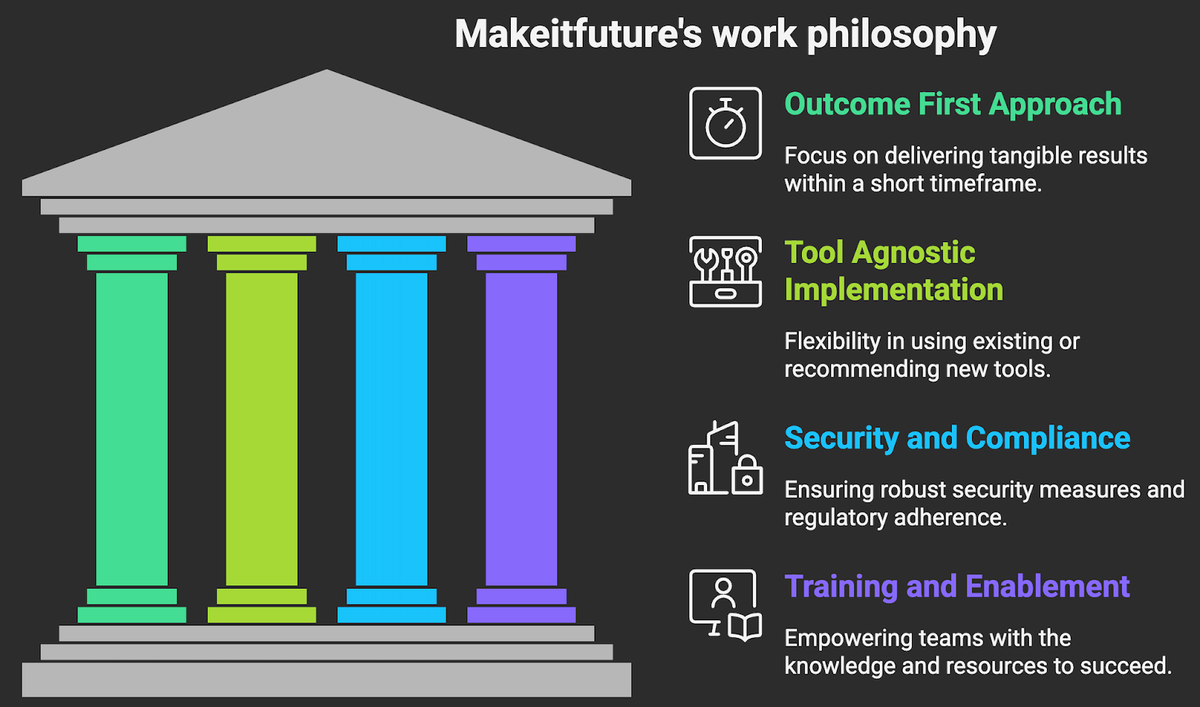
- Outcome first approach, we size the value and pick pilots that show results in 30 to 90 days.
- Tool agnostic, we implement with your stack, or recommend fit for purpose platforms if gaps exist.
- Security and compliance built in, role based access, logging, and approvals as default patterns.
- Training and enablement, your team gets the playbooks and dashboards to run day to day.
Take a look on how we partner with growth stage and enterprise teams on automation and AI.
If you want to see outcomes in context, review selected client stories that span CRM, marketing, and operations in our case studies.
What is your organization’s biggest bottleneck? Contact us and let’s solve it together.